
One approved payment shop. Multiple country stores.
Bizney Order Bridge lets international WooCommerce stores send orders to one central payment shop, so customers can browse locally and pay securely through your approved payment hub.
Bizney Payment Hub
One approved WooCommerce payment shop processes orders from multiple country storefronts.
The problem
International stores often get stuck at payment setup.
Expanding into new countries can be difficult when every store needs its own payment gateway, merchant setup, approval process, Stripe configuration, testing, and checkout troubleshooting.
If one WooCommerce shop already has payment processing working properly, Bizney Order Bridge helps other country stores connect to that payment hub.
- ×Repeated payment setup on every country shop
- ×Manual order copying between websites
- ×Disconnected payment links and order records
- ×More checkout issues every time you enter a new market

Local storefronts
Each country shop can have its own content, language, pricing, and customer journey.
Central checkout
The approved payment shop handles the secure WooCommerce payment flow.
Order handover
The plugin sends order data securely between WooCommerce stores.
Status sync
Payment results can sync back to the original source order.
How it works
Connect country stores to one approved WooCommerce payment shop
Bizney Order Bridge creates a secure handover between your source shops and your payment shop, then keeps the order status synced.
Customer shops locally
The customer browses and checks out on a country-specific WooCommerce store.
Order is bridged
Bizney Order Bridge securely sends the order details to the payment shop.
Payment order is created
The payment shop creates a matching WooCommerce order using matching SKUs.
Customer pays securely
The customer pays through the gateway already configured on the payment hub.
Status syncs back
The source shop receives the payment result and updates the original order.
Software highlights
Built for multi-country WooCommerce selling
A practical plugin for businesses that want to centralise payment processing while running multiple country, brand, or campaign storefronts.
Multi-country setup
Run separate WooCommerce shops for different countries, markets, languages, or brands.
Central payment hub
Use one WooCommerce site as the approved payment shop for multiple storefronts.
Signed requests
Bridge communication is protected using a shared secret and signed REST requests.
Status sync
Payment results can sync back from the payment shop to the original country shop.
SKU matching
Products are matched between source shops and the payment shop using WooCommerce SKUs.
WooCommerce Blocks support
Supports modern WooCommerce checkout flows, including Checkout Blocks.
Guest-payable orders
Customers can pay on the payment shop without needing a separate login account there.
Custom payment names
Set cleaner product or variation names on the payment shop for payment order details.
Debug logging
Optional WooCommerce logs help trace order handover, redirects, and payment status updates.
Use cases
When Bizney Order Bridge makes sense
Designed for businesses that need more payment flexibility than a single WooCommerce website can provide.
International stores
Sell through country-specific websites while processing payment through one approved payment shop.
Market testing
Launch a new country shop faster without rebuilding your full payment setup immediately.
Agency projects
Connect several WooCommerce storefronts for one client to a central payment system.
Brand-specific shops
Run separate brand or campaign shops while keeping payment processing in one place.
Centralised operations
Keep payment management, gateway setup, and transaction handling on one WooCommerce site.
Existing payment approval
Use the country shop where payment processing is already configured and approved.
FAQ
Common questions
Can one payment shop handle orders from multiple country shops?
Yes. Bizney Order Bridge is designed so multiple WooCommerce source shops can send orders to one central WooCommerce payment shop.
Does this replace Stripe?
No. Bizney Order Bridge does not replace Stripe or any payment gateway. It connects WooCommerce stores and lets the payment shop use its existing gateway.
Do all stores need WooCommerce?
Yes. The plugin is designed for WooCommerce-to-WooCommerce order bridging.
Do products need matching SKUs?
Yes. Products should have matching SKUs between the source shop and the payment shop.
Can each country shop have different branding?
Yes. Each country shop can have its own branding, content, language, pricing, and customer journey.
Can this work with Stripe?
Yes. The payment shop can use Stripe if Stripe is already installed and configured there.
Businesses should ensure their payment, tax, currency, and legal setup is appropriate for each country where they sell.
Turn one WooCommerce site into your central payment hub
Connect your country shops, send orders securely, and process payment through your approved WooCommerce payment site.
Plugin setup
Easy to configure, flexible across different websites
Bizney Order Bridge is designed for real WooCommerce setups where the source shop and payment shop may live on different URLs, different domains, or different country websites.
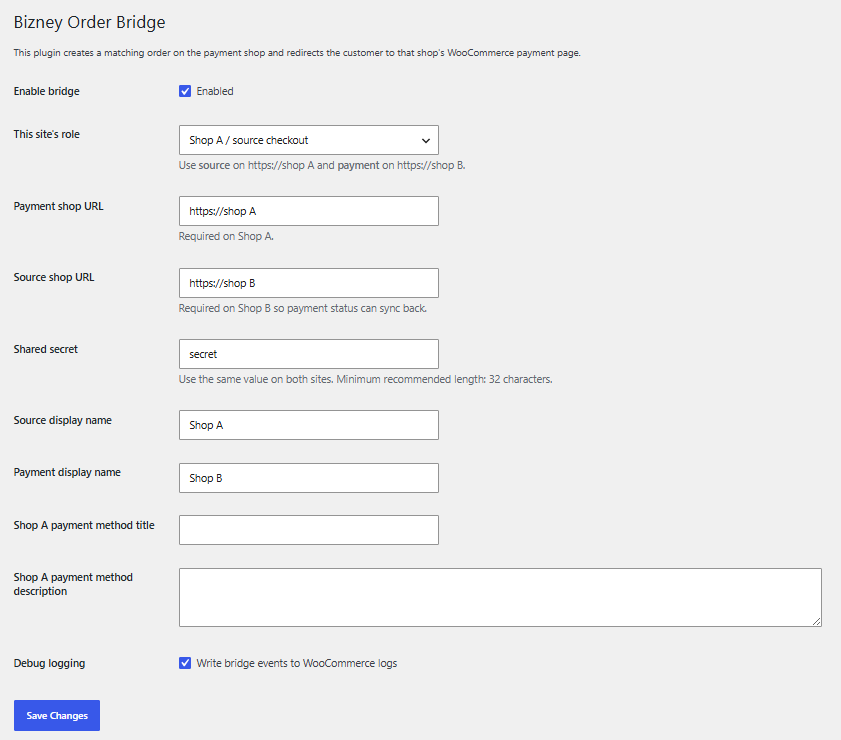
Connect separate WooCommerce shops in minutes
Choose whether the website is the source shop or the payment shop, add the payment shop URL, source shop URL, and shared secret, then enable the bridge.
The plugin supports different URLs and does not require both shops to be on the same domain. This makes it suitable for multi-country WooCommerce stores, separate brand websites, or centralised payment hub setups.
- Source shop and payment shop roles
- Different domains supported
- Shared secret connection
- Debug logging for testing and support
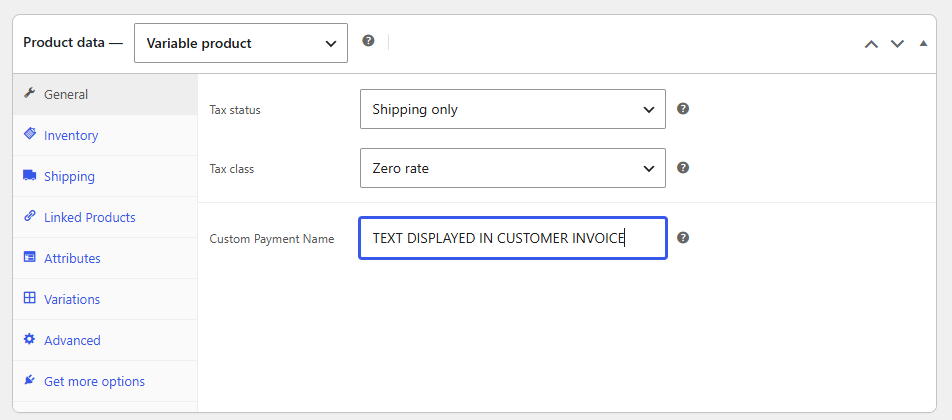
Custom product names for payment and invoices
On the payment shop, you can set a custom payment name for products or variations. This allows the payment order and customer invoice to show a cleaner, more suitable product name.
For the customer, the process stays seamless. They order from the country shop, pay through the central payment hub, and see clear product information during payment and invoicing.
- Custom payment names
- Cleaner customer invoices
- Works with product variations
- Seamless payment experience
Use one Stripe account through your central payment shop
Bizney Order Bridge is designed to work with a central WooCommerce payment shop that already has Stripe configured.
Instead of setting up Stripe separately on every country store, your source shops can send orders to the payment hub, where payment is completed using the Stripe account already connected to that WooCommerce site.
One Stripe setup
Use the Stripe account connected to your central WooCommerce payment shop.
Multiple country shops
Country storefronts can send orders to the same payment hub for checkout.
Payment status sync
Once Stripe payment is completed, the source order can be updated automatically.
Secure payment flow
The customer pays on the payment shop using the existing WooCommerce Stripe checkout flow.
Bizney Order Bridge does not replace Stripe. It connects WooCommerce stores so the payment shop can process payments using its existing Stripe configuration. Businesses should ensure their Stripe, tax, currency, and legal setup is suitable for the countries they sell in.
Central payment shop
One WooCommerce Stripe account processes payment for connected source shops.
Order Bizney Order Bridge
Get the WooCommerce plugin that connects multiple country stores to one central payment hub.
Secure payment handled by PayPal. After ordering, we will contact you with plugin delivery and setup details.